
Location Report Help
The AirKeeper Dashboard Location Report lets you summarize and illustrate air quality and related factors in your area of interest. Simply select a county, zip code, or location to define a radius, and generate a report with clear and interactive graphs.
Your report will include a map of the selected location, along with a comprehensive overview of air sensor data, potential pollution sources, community demographics, health outcomes, and other contextual datasets. Each section’s data can be downloaded for external analysis, and the report can be printed or shared digitally as a beautifully formatted PDF with live links.
The top section of your report provides a quick overview of your chosen location:
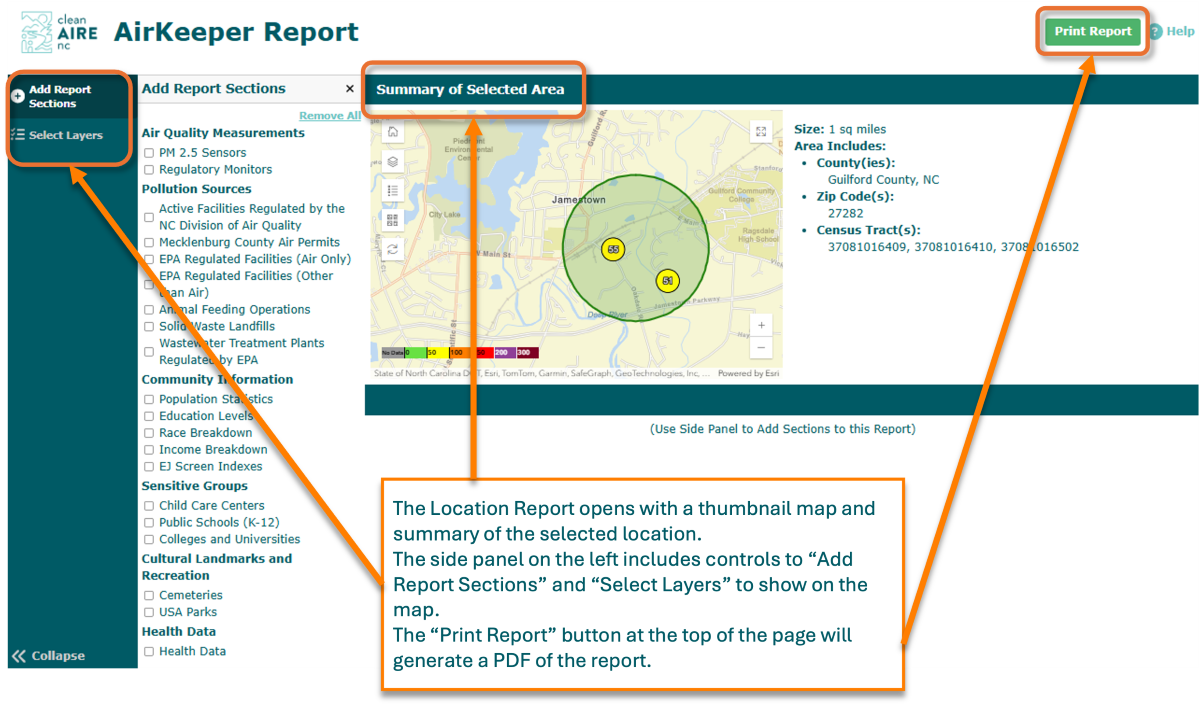
Below the Summary of Selected Area, you can build your report by adding sections to contribute to a more complete picture of your selected area. Use the Add Report Sections panel (found on the left side of the screen) to show or hide these sections, allowing you to focus on the information most relevant to your analysis.
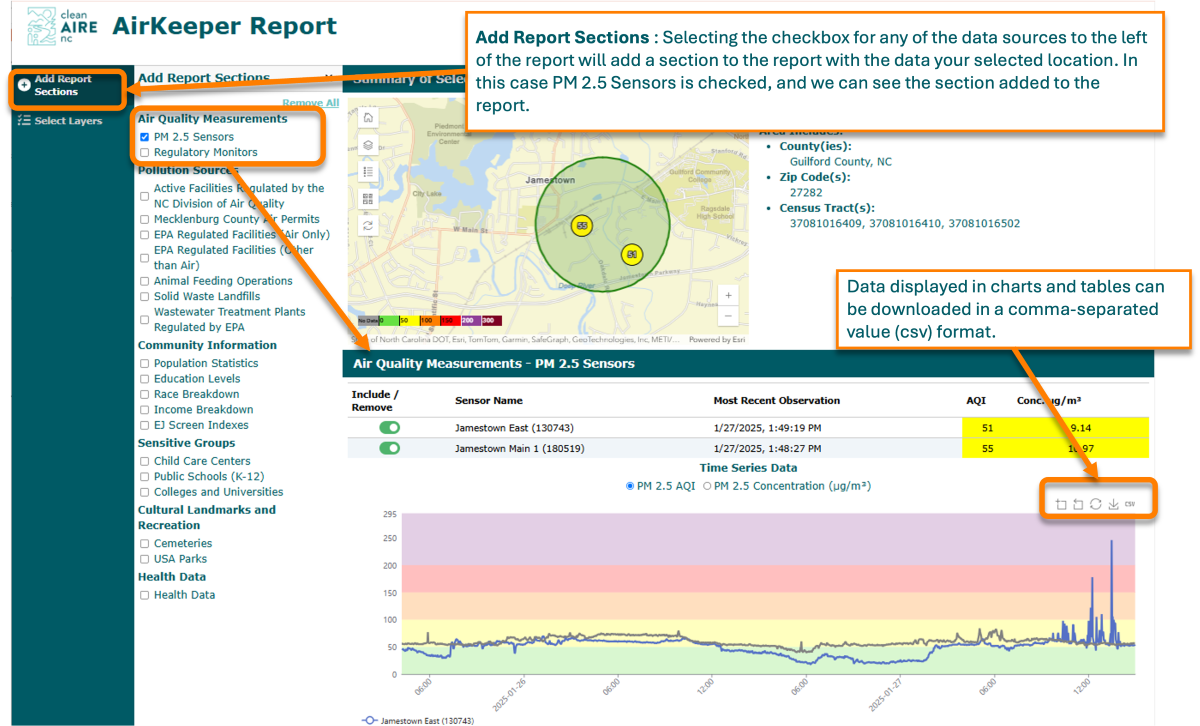
This section displays a table of PurpleAir sensors in your selected area. The table presents information on each sensor, including sensor names; time of the most recent observation; AQI value; and PM2.5 concentration (µg/m³). You can toggle sensors on or off to add or remove them from the time-series chart below the table, which shows data measurements over time. Hover over the data lines to display the date, time, sensor name, and reading. The time-series chart also includes zoom, restore, and save (as an image or CSV file) functionalities.
You can also view a table of all regulatory air monitors found in your selected area, with information on each sensor including the monitoring site; the regulatory agency operating it; the air pollutant it measures (ozone, CO, NO2, or PM2.5); AQI values and pollutant concentrations; and the EPA Air Quality System (AQS) Identification Number. Use the toggle to include or remove a sensor from the time-series chart below the table, to compare data trends from multiple sensors or focus on just one. The time-series chart also includes zoom, restore, and save (as an image or CSV file) functionalities.
This section lists active facilities located within your selected radius that are regulated by the NC Division of Air Quality (DAQ), a division of the NC Department of Environmental Quality (NCDEQ). A table details the facility name; DAQ facility ID; classification; locational data; NAICS (North American Industry Classification System) and SIC codes; and links to permit documents, public records, and the EPA ECHO report for the facility.
Adding this report section displays a table of facilities with air permits issued and managed by Mecklenburg County Air Quality (MCAQ) within your selected area. The table includes information on the MCAQ site number and site name; source classification code; and geographic data such as the address, city, and zip code.
Note: MCAQ air permits cover a wider range of air pollution sources than DAQ permits. Direct comparisons between MCAQ and DAQ permits are therefore not recommended—this data layer should only be used for comparisons within Mecklenburg County.
This table presents facilities regulated by the EPA under the Clean Air Act (CAA) within your defined radius, with information on each facility such as the registry ID; the facility name; geographic location data; and a link to the Detailed Facility Report.
Note: This data layer presents a standardized view of federally regulated facilities throughout North Carolina, overlapping with most DAQ permits.
A table of other EPA-regulated facilities within your selected area, focusing on those regulated under the Clean Water Act, Resource Conservation and Recovery Act (RCRA), or the Safe Water Drinking Act. Information is provided on each facility, including the registry ID; the facility name; geographic location data; and a link to the Detailed Facility Report.
A list of permitted concentrated animal feeding operations (CAFOs) located within your selected area. The table provides information on each facility name; permit number; permit type and status; key permitting dates (original date of issue, when it took effect, and expiration date); facility owner; owner type, location data; total livestock weight; allowable livestock count; last inspection date and description; and links to relevant document.
Note: Dry poultry operations are not permitted, and this data layer does not show the locations of most poultry operations in North Carolina. See the USDA Agricultural Census for more information.
This section of the report lists the (permitted) solid waste landfills located within your selected area. The table provides information about each landfill, including the permit ID; site name; location data (address, city, zip code, and county); the primary and operation types of the landfill; permit status; and operating status.
This section displays a list of the wastewater treatment plans regulated by the EPA within your defined radius. For each facility, the table provides a facility name; registry and NPDES ( National Pollutant Discharge Elimination System) ID; locational data; NAICS (North American Industry Classification System) and SIC (Standard Industrial Classification) codes; the permit status, type, and issuing agency; the facility type; state waterbody name; facility size (either major or minor); and a link to the facility’s EPA ECHO report.
This section provides key population data, both statewide (North Carolina) and for the counties within your selected area. You’ll find information on total population; land area (in square miles); population density; and a breakdown of the population by three age groups (under 18, between 18 and 65, and over 65). Both the number of people and the percentage of total population is presented for each age group.
Selecting this report section adds a table with educational attainment data for both North Carolina and the counties within your selected radius. The table displays the total population above the age of 25, along with the percentage of individuals with various levels of education: less than high school; high school diploma or equivalent; some college; associate’s degree; and bachelor’s degree or higher. The data is also visualized as a downloadable bar chart, with an option to switch between standard and stacked bar chart formats. Use the icons to the right of the chart to download it (as an image or CSV file).
This section displays racial demographic data for both North Carolina and the counties within your selected area. A table features population counts and percentages for the following groups: American Indian or Alaskan native; Asian; Black or African American; native Hawaiian and other Pacific islander; persons of Hispanic origin; another race; two or more races; or white. Both the state and county level data are also available in a downloadable bar chart, which can be viewed in either standard or stacked bar chart formats. Use the icons to the right of the chart to download it (as an image or CSV file).
This report section displays median household income (as both a table and a chart) for North Carolina and the counties within your defined radius. Use the icons to the right of the chart to download it (as an image or CSV file).
Selecting this checkbox will present a table detailing childcare centers that lie within your defined radius. For each childcare center the table lists the facility name and its complete address.
Note: This dataset is limited to center-based facilities (including those in religious institutes and schools). It does not include group, home, or family-based childcare services.
This section lists public K-12 schools within your selected area in a table, which details school name and address; school level (elementary, middle, or high); enrollment numbers; grade range; and district ID. The table includes public and elementary education facilities in the U.S. as defined by the Common Core of Data, the National Center for Education Statistics, and the U.S. Department of Education for the 2022-2023 school year.
Selecting this report section adds a table detailing the name, address, city, state, and zip code for any colleges or universities within your defined radius.
Note: Only institutions with 500+ students and verifiable campus maps are included. Online institutions and administrative colleges are excluded from this data.
The name and county associated with cemeteries located within your selected radius are presented neatly in a table.
Checking this box will display the name, area (in square miles), and feature type of any parks located within your selected radius.
This section displays the county health rankings for each county within your selected area (i.e. their rank in health outcomes among all 100 North Carolina counties). The table also lists population numbers for your selected counties, along with North Carolina’s statewide population. Estimates are derived from the 2021 County Health Rankings & Roadmaps, a collaboration between the Robert Wood Johnson Foundation and the University of Wisconsin’s Population Health Institute.
This section displays the percentage of the population affected by six key health metrics in North Carolina and the counties within your selected area. The table and accompanying bar chart feature asthma, cancer, chronic obstructive pulmonary disease (COPD), heart disease, smoking, and mental health. The interactive bar chart is color-coded to visually distinguish each of these health metrics. It also shows the prevalence of each metric at both the state and county levels; hovering over a health metric bar in one county highlights the state average for comparison. (You can choose to eliminate the state comparison with a slider bar at the bottom of the chart.)
Note: Please check back for new additions to report sections to match Select Layers.